Docker for Developers: Complete Beginner Guide
Unlock the power of Docker with our comprehensive beginner's guide. Learn essential concepts, tools, and techniques for effective container deployment.
Published
25 May 2026
Reading Time
2 min read
Author
Infotact Team
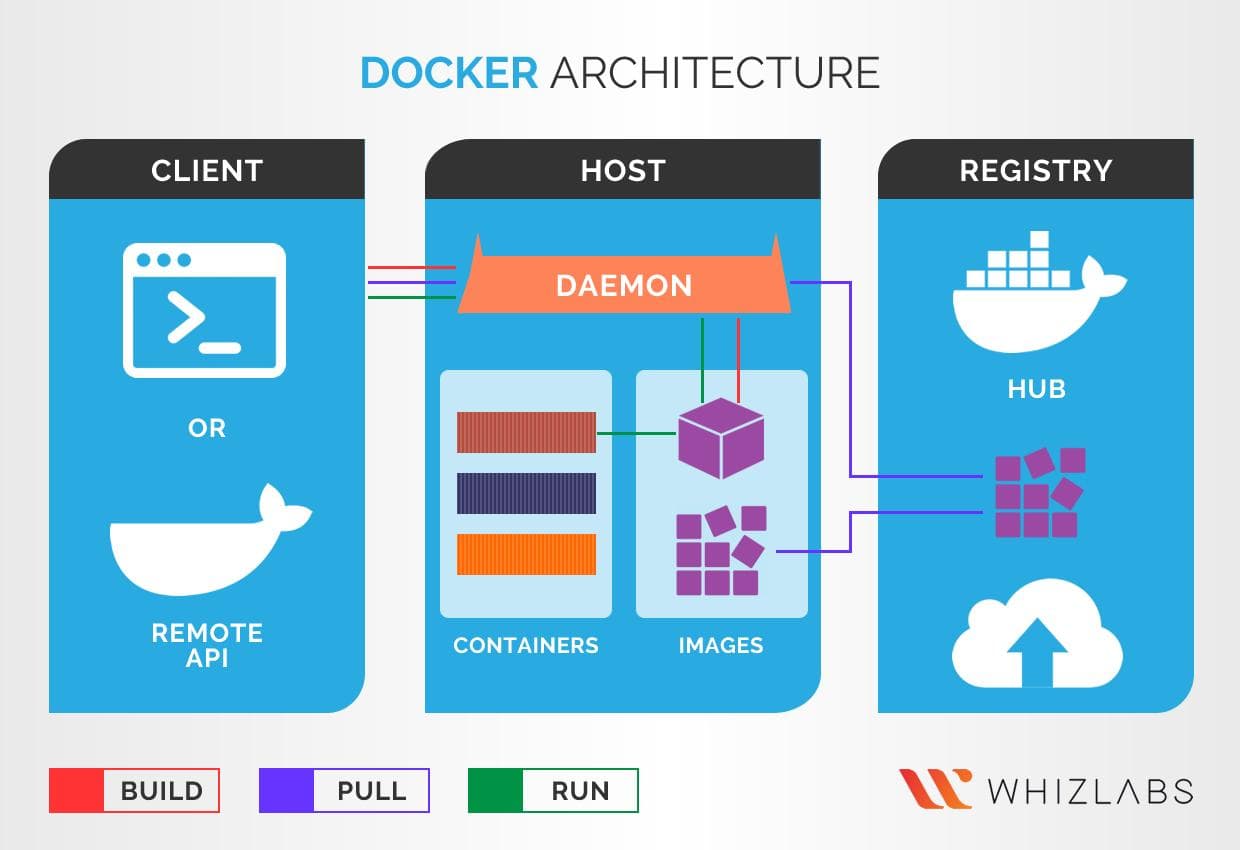
Docker for Developers: Complete Beginner Guide
In today's fast-paced development environment, Docker has become an essential tool for developers. This guide provides a complete introduction to Docker, covering the basics, Dockerfiles, Docker Compose, and how to deploy your containers effectively.
Understanding Docker Basics
Docker is a platform that enables developers to automate the deployment of applications inside lightweight, portable containers. These containers encapsulate everything needed to run an application, including code, libraries, and dependencies.
Why Use Docker?
- Consistency across environments
- Isolation of applications
- Scalability and resource efficiency
The Dockerfile
A Dockerfile is a text document that contains all the commands to assemble an image. Here’s a simple example of a Dockerfile for a Node.js application:
FROM node:14
WORKDIR /usr/src/app
COPY package*.json ./
RUN npm install
COPY . .
EXPOSE 8080
CMD [ "node", "server.js" ]
This Dockerfile starts from a base Node.js image, sets the working directory, copies package files, installs dependencies, and finally runs the application.
Using Docker Compose
Docker Compose is a tool for defining and running multi-container Docker applications. You can define your app's services, networks, and volumes in a single YAML file.
Example Docker Compose File
version: '3'
services:
  web:
    build: .
    ports:
      - "8080:8080"
  db:
    image: postgres
    environment:
      POSTGRES_PASSWORD: example
This configuration sets up a web service and a PostgreSQL database, allowing them to communicate seamlessly.
Deploying Your Container
Once your Docker image is built, you can deploy your container using the following command:
docker run -d -p 8080:8080 my-node-appThis command runs your application in detached mode and maps port 8080 on your host to port 8080 in the container.
Conclusion
Docker streamlines the development and deployment process, allowing developers to focus more on building applications rather than managing environments. Start using Docker today to enhance your development workflow!
Highlights
- •Understand Docker fundamentals
- •Learn to create Dockerfiles
- •Master Docker Compose for multi-container apps
- •Deploy and manage containers effectively
Need similar implementation support?
Work with our engineering team on scalable web apps, backend architecture, and growth-ready product delivery.
Related Content
Keep reading similar insights
General
Loud Deployment Made Simple: A Comprehensive AWS + Docker Guide
Master the art of deploying applications using AWS and Docker with this detailed guide. Learn about Docker, CI/CD, and scaling your MERN app effectively.
General
Microservices Architecture Explained for Beginners
Discover the essentials of microservices architecture, comparing it with monolithic systems, and explore real-world applications such as Netflix and Amazon.
General
Building a Production-Ready REST API with Node.js
Learn how to build a robust REST API using Node.js, covering essential topics like folder structure, middleware, error handling, authentication, and rate limiting.